Prime Dental
Built by a practising dentist

Practice software that works without internet.

Prime Dental runs on the computer at your reception desk. Patient records, clinical notes, prescriptions, billing, stock and PHC compliance registers — all in one place, all stored on your own machine. No monthly cloud bill, no waiting for the connection to come back.

Windows 10 / 11 · about 5 MB to install · your data never leaves the clinic
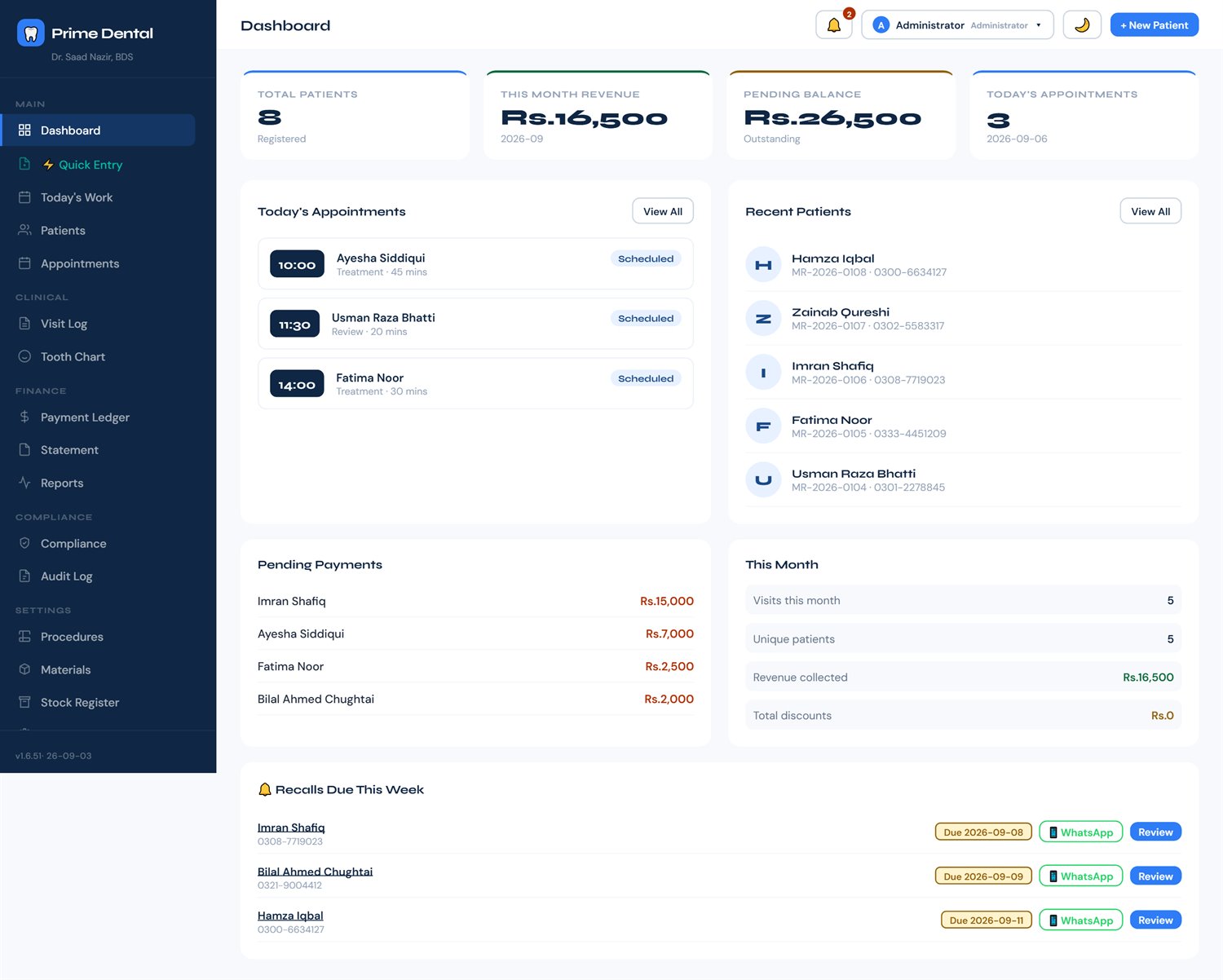
Prime Dental — Dashboard
Prime Dental dashboard showing today's appointments, pending payments and recalls due this week
🔌Works offlineThe clinic's daily work needs no internet. Load-shedding and dead connections don't stop the clinic.
🔒Your data stays yoursEverything sits on your PC. Nothing goes online unless you switch on the optional calendar sync.
📋PHC-mindedMR numbers, per-visit timestamps, registers and a tamper-evident audit log.
📤No lock-inExport everything to CSV or PDF whenever you want. It's your record.
See it running

A full walk through the software

Recorded in the actual app — from the morning dashboard through a complete patient visit, billing, stock and the compliance registers.

▶
Demo video
Paste your YouTube ID into YOUTUBE_ID at the top of index.html and this becomes the player.
The whole thing, in pictures

What a working day looks like

Every screen below is the real software — nothing mocked up. The patients are invented for the demo.

1

Open it and the day is already laid out

No hunting. The dashboard shows who is coming today, who owes money, and who is due for a recall — the three things you actually need before the first patient sits down.

  • Today's appointments with time, type and duration
  • Pending balance across all patients, and who each amount belongs to
  • Recalls due this week — with a WhatsApp button that opens the message ready to send
Dashboard with appointments, pending payments, and recalls
2

Patients, with a real medical record number

Each patient gets a unique MR number, full contact and medical history, allergies, current medications and referral source. Search by name, number or MR.
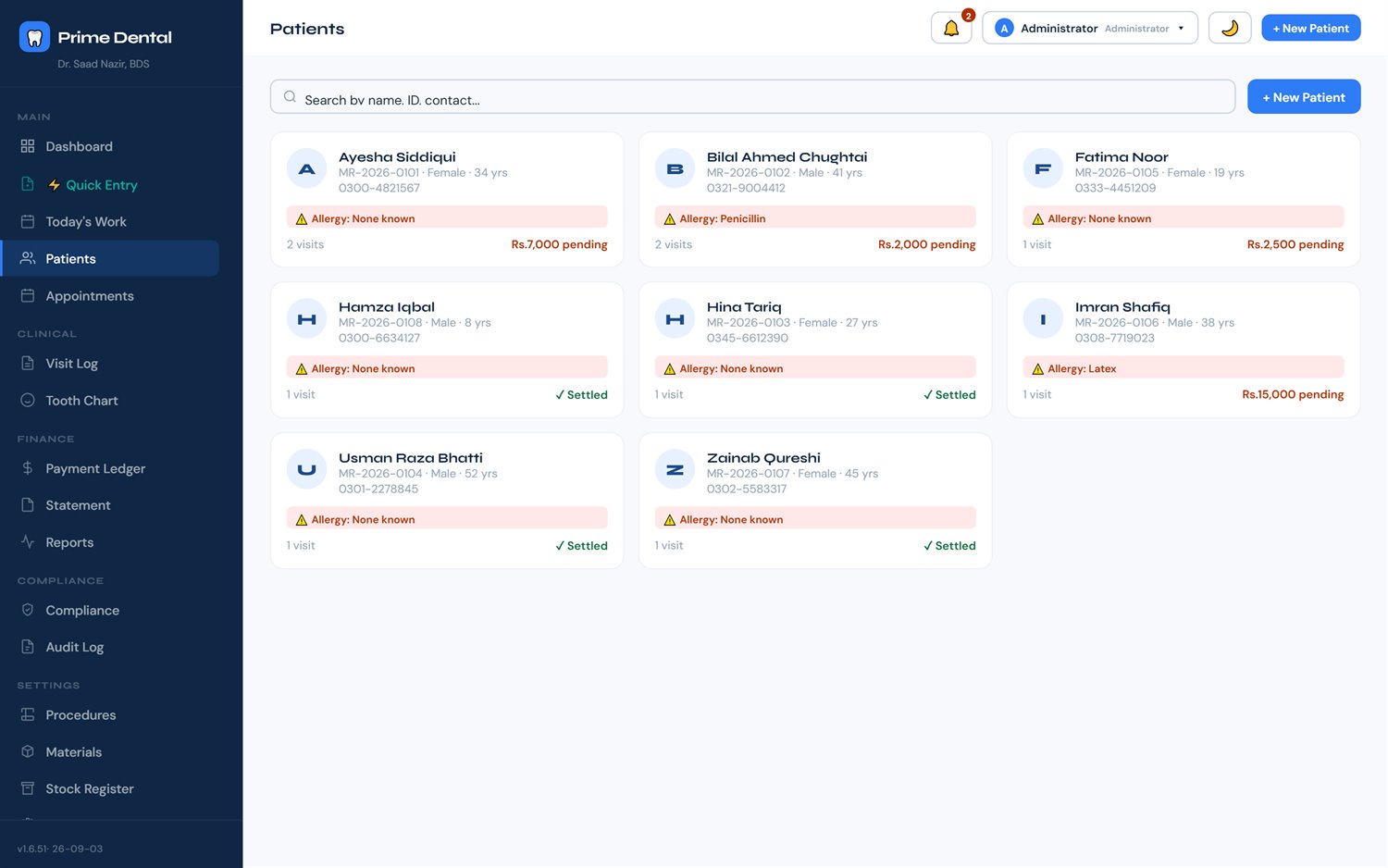
  • Allergies and medical conditions surface on every clinical document
  • Family links, occupation, emergency contact
  • Attach X-rays and photographs to the record
Patient list with MR numbers and contact details
3

Notes that are actually structured

Every visit is recorded as a proper clinical note — complaint, history, findings, diagnosis, treatment, prescription and instructions — instead of one free-text box you can never search later.
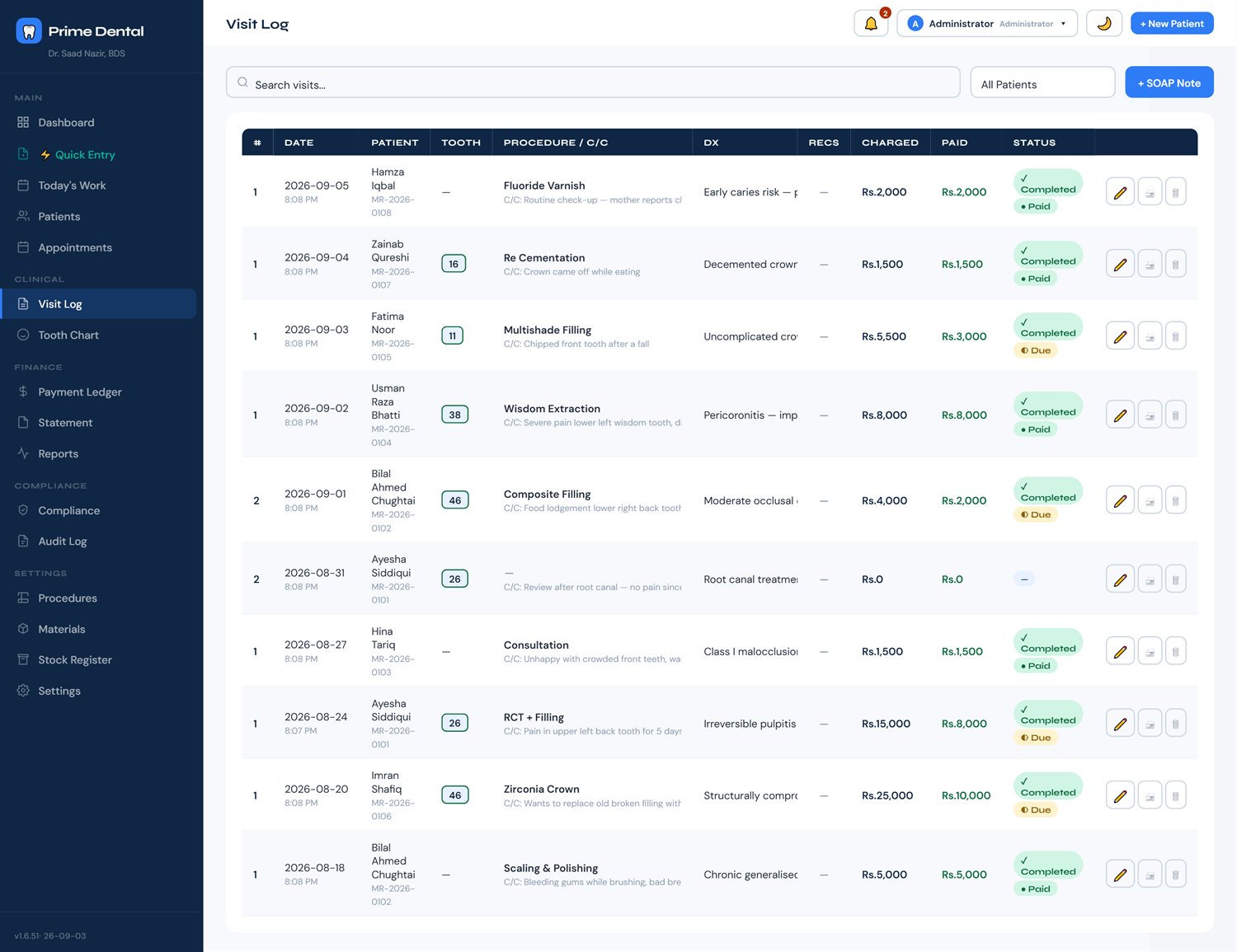
  • Three encounter types: Consultation, Treatment and Review
  • Findings recorded per tooth, in FDI, Universal or Palmer numbering, whichever your clinic uses
  • Root canal grid: working length, reference point, master file and obturation, canal by canal
  • A review knows which visit and which tooth it is following up, and picks that tooth for you
  • What was charged and what was paid sit on the same line as the clinical work
Visit log listing visits with tooth number, procedure, diagnosis, charged and paid
4

A tooth chart that remembers

The full chart for every patient, adult and primary teeth, built up from the visits you have already recorded. Click a tooth to see its whole history rather than scrolling through years of notes.
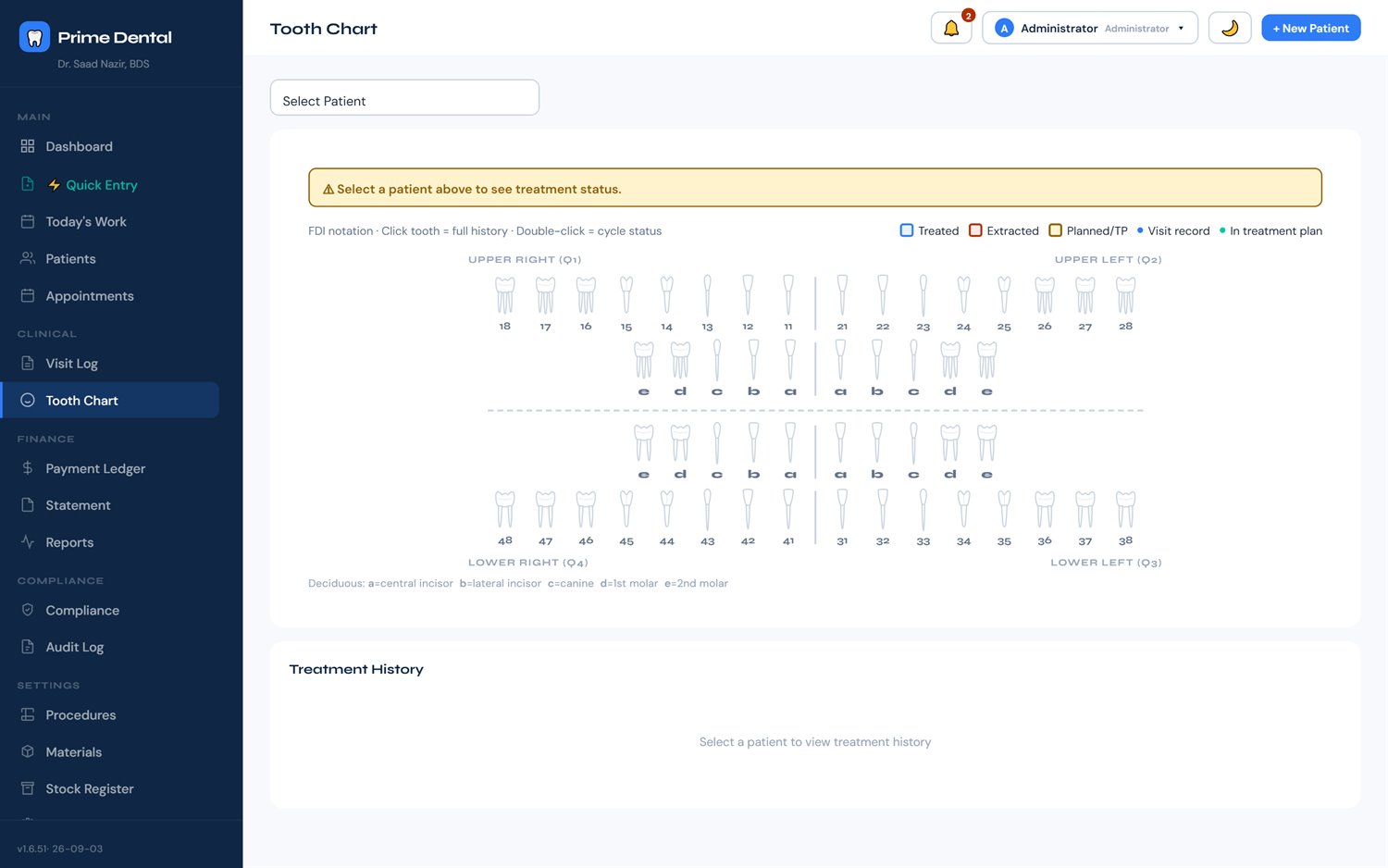
Tooth chart for a patient
5

Root canals, canal by canal

An RCT over several sittings is recorded as one treatment. Each canal gets its working length, reference point and master file, and the next sitting opens with all of it already filled in.
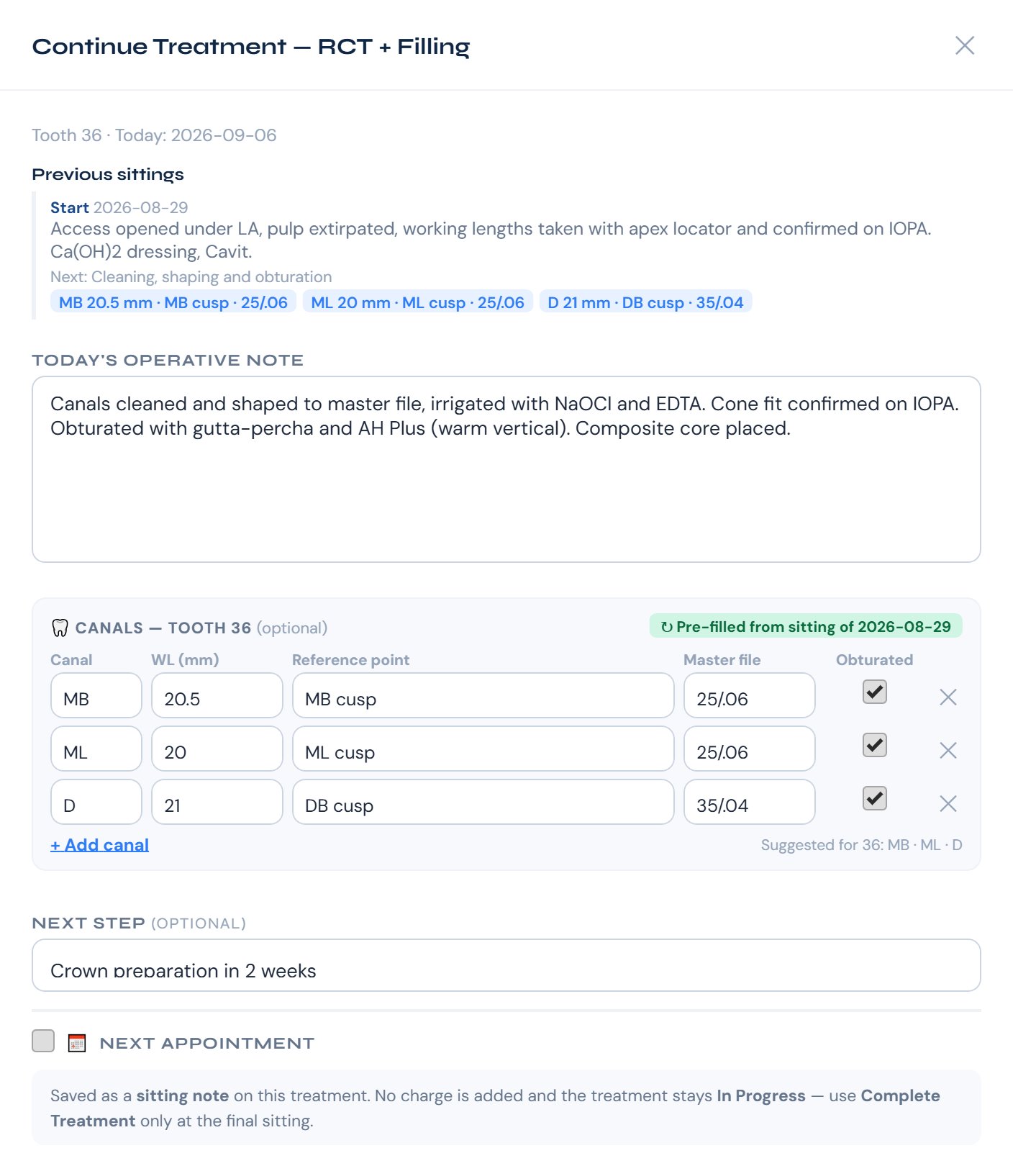
  • Canal names suggested for the tooth (MB, MB2, DB, P…) and always editable
  • Every earlier sitting shown above today's note
  • Tick each canal as it is obturated. The canals print on the clinical record.
Continue Treatment window for an RCT on tooth 36 showing the previous sitting and a canal grid with working length, reference point, master file and obturated tick for MB, ML and D canals
6

An orthodontic chart for every braces case

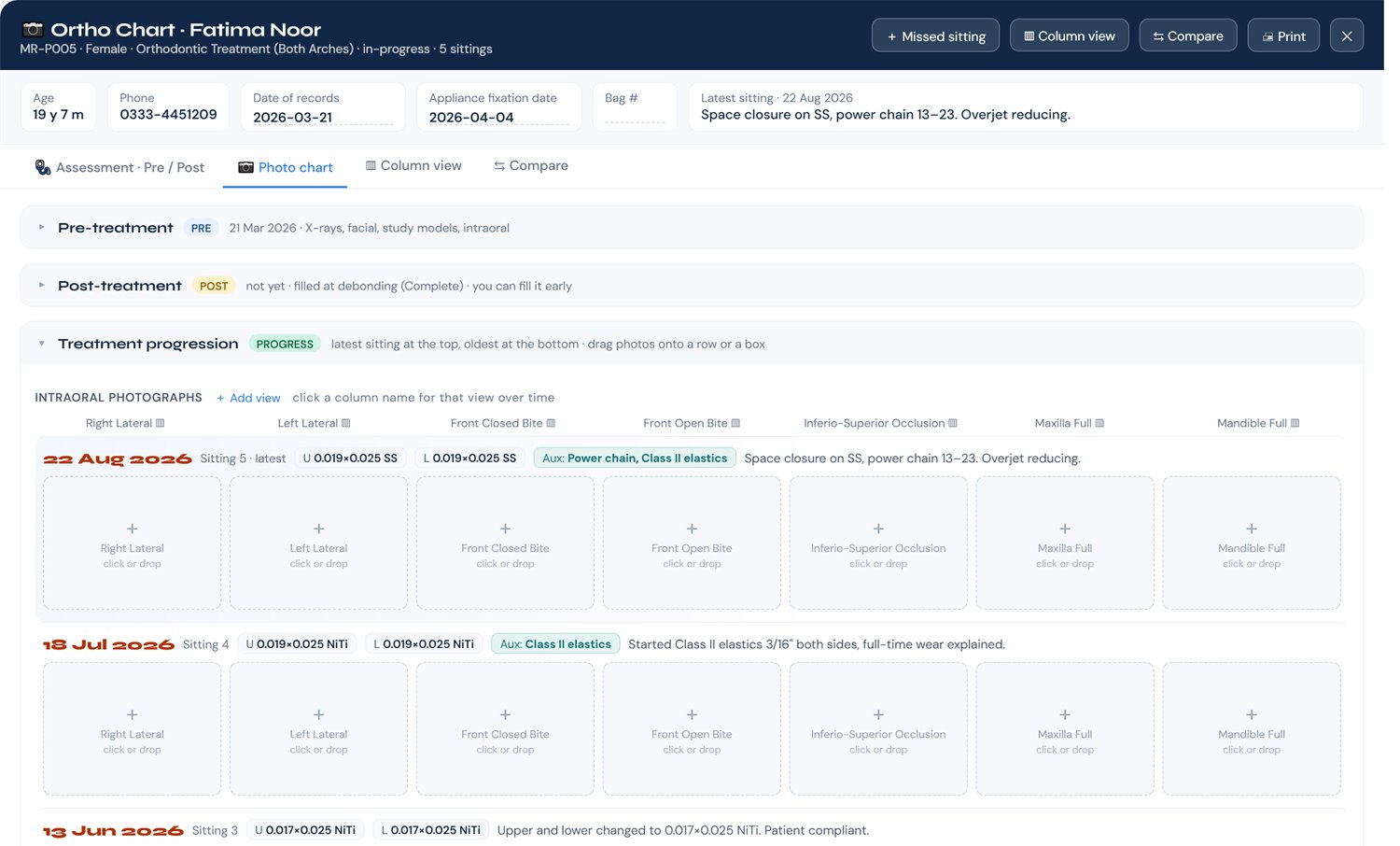
Pre-treatment records, every adjustment sitting and the debond, all in one place. Each sitting keeps its wires and auxiliaries, and the pre and post readings sit side by side.
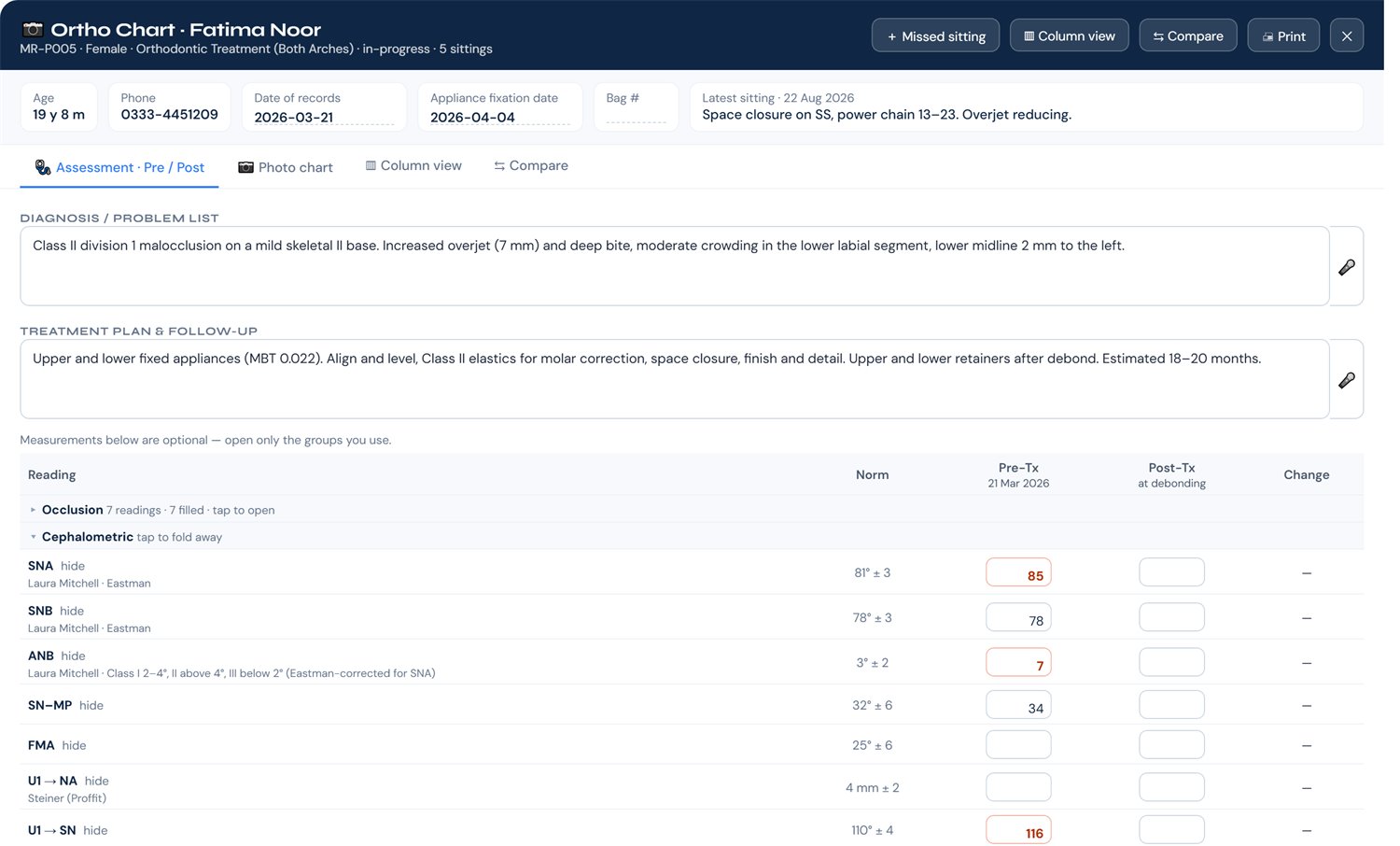
Ortho chart assessment tab with diagnosis, treatment plan and pre and post treatment readings, each with its textbook normal range
Assessment: diagnosis and plan first, then the readings. Each one shows its textbook normal range (Laura Mitchell, Steiner) and anything outside it turns red
Ortho photo chart showing treatment progression sittings, newest first, each with upper and lower wire and a row of photo boxes
Photo chart: newest sitting on top with its wires. Drop the photos into the boxes and they are kept at full original size. Compare any two sittings side by side.
7

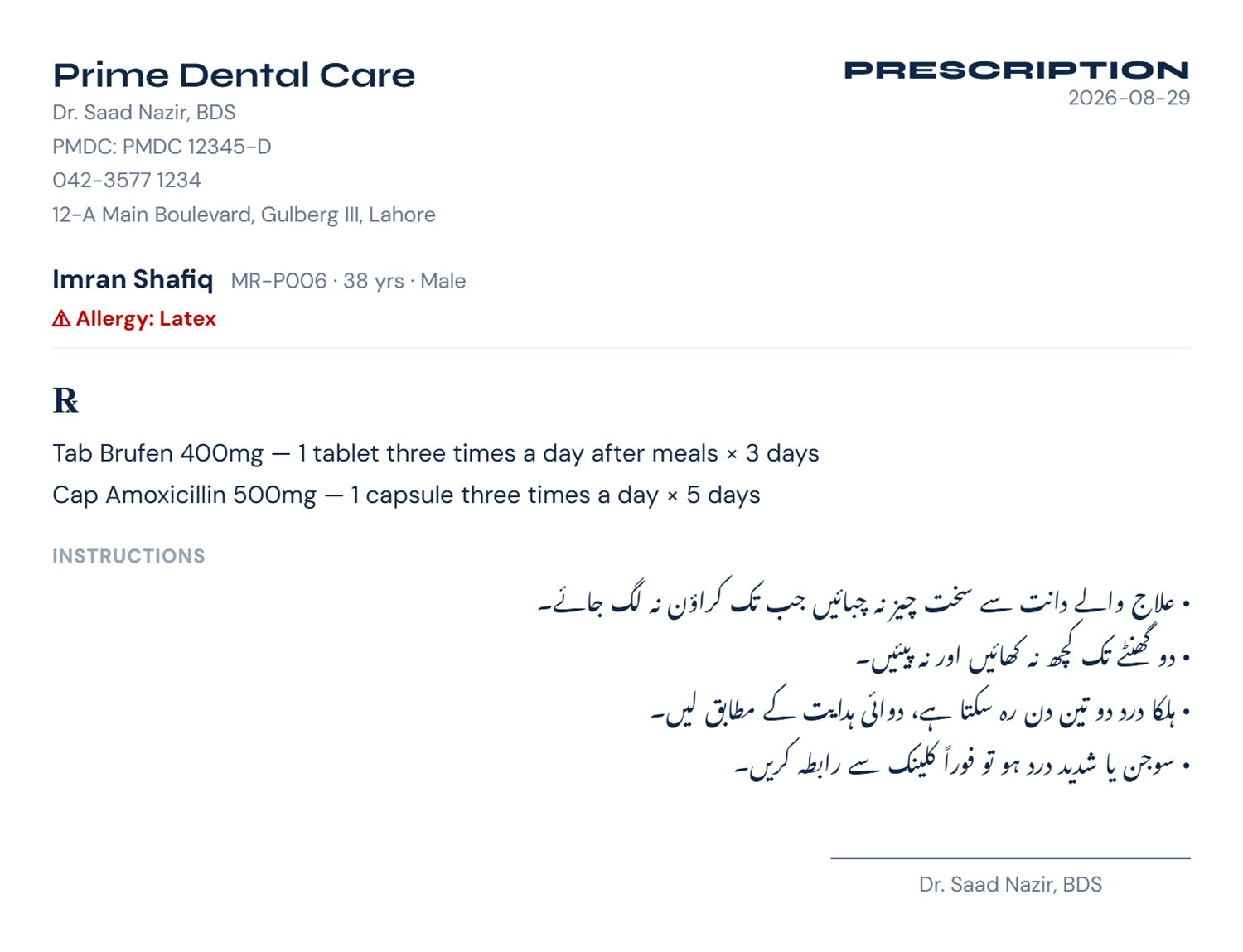
Two documents come out of every visit

One for your file, one for the patient's hand — both on your letterhead with your name and PMDC number, both generated automatically from the note you already wrote. No retyping, no separate prescription pad.
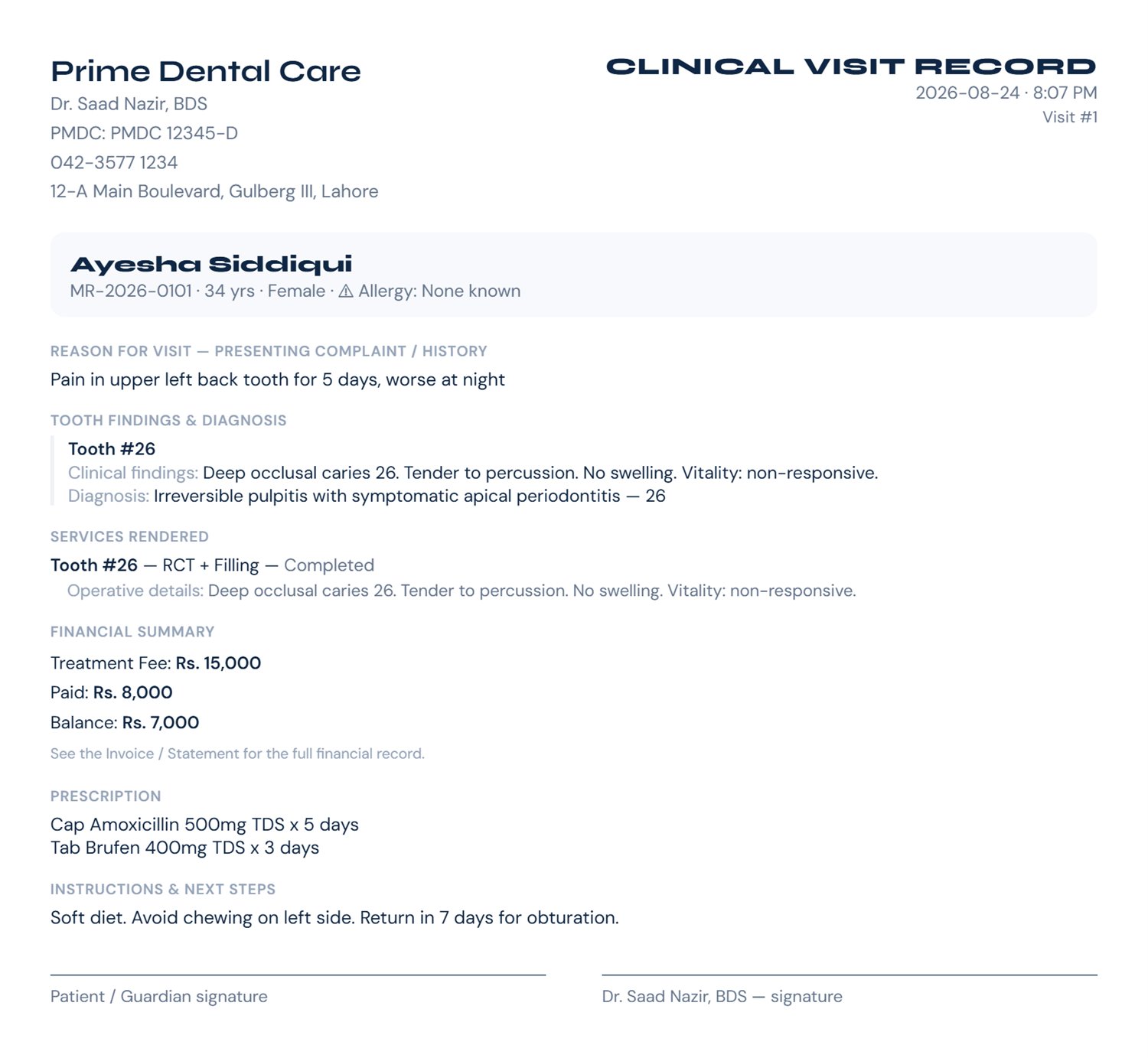
Printed clinical visit record on clinic letterhead showing complaint, findings, diagnosis, services rendered, financial summary and prescription
Clinical Visit Record — the full note, for your file
Patient prescription handout with English prescription and post-treatment instructions written in Urdu Nastaliq
Patient handout — prescription and instructions only, in English or Urdu (Nastaliq). Save it as an image and send it on WhatsApp.
8

Money, tracked to the procedure

Every payment is attached to the treatment it paid for — not dumped in a daybook. Part-payments, discounts and multi-procedure packages all behave properly.
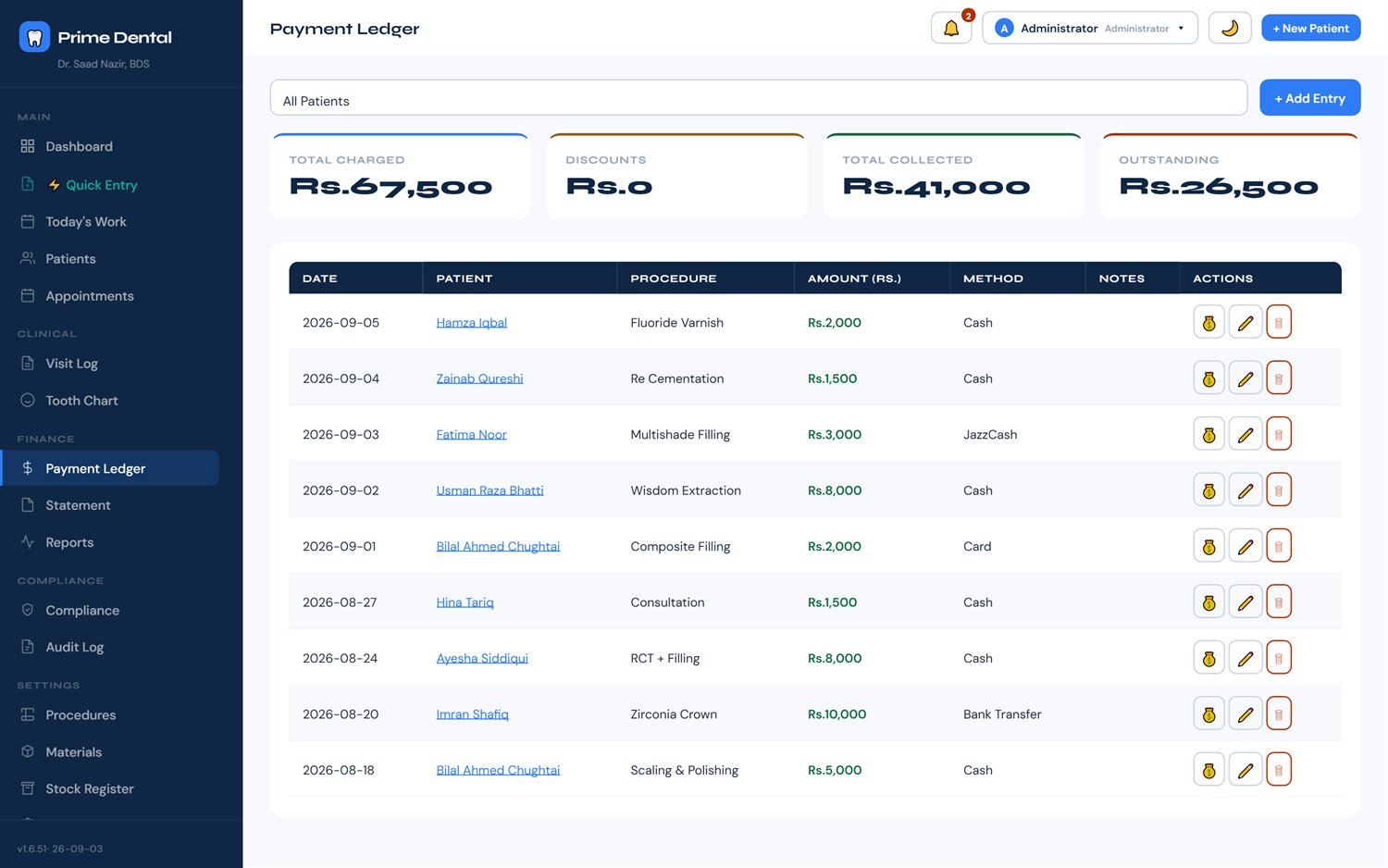
  • Ledger of every payment with method and date
  • Per-patient statement you can print or hand over
  • Outstanding balance always visible, per patient and overall
Payment ledger listing payments by patient, method and date
9

Reports that answer real questions

What did the clinic earn this month, which procedures actually bring in the money, who hasn't come back — without exporting anything to Excel first.
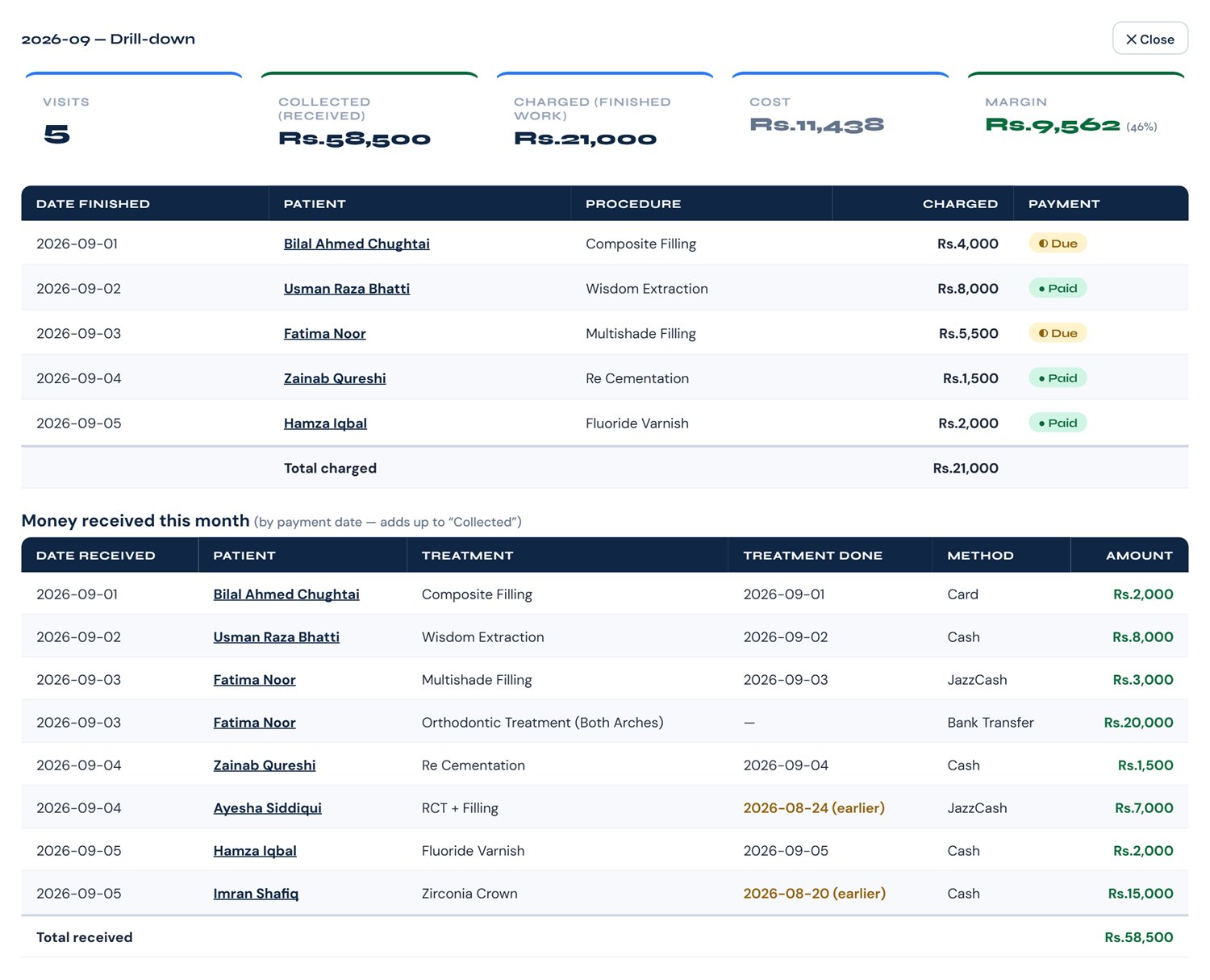
  • Click any month to see the work finished and every rupee received that month
  • Old dues paid this month are marked earlier, so the month adds up exactly to what came in
  • Discounts and fee changes are listed on the day they were made
Reports month drill-down showing work finished and a Money received this month table, with old dues marked as earlier
10

Stock that counts the way a clinic actually uses things

Most software counts boxes. A composite syringe isn't a box — it's roughly thirty restorations. Prime Dental tracks packs, pieces and uses per piece, so what it tells you is close to the truth.
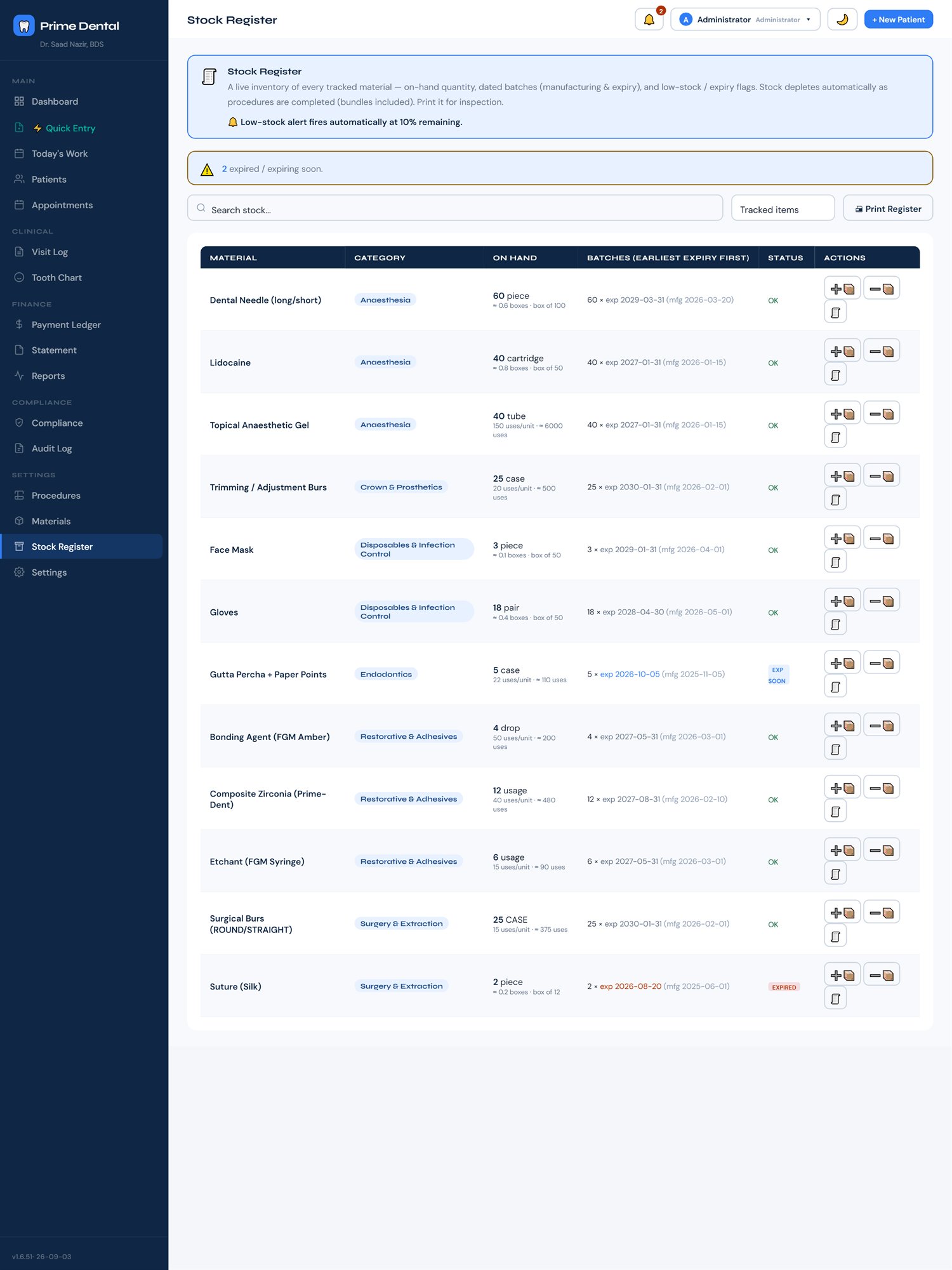
  • Batch and expiry tracking with oldest-first (FEFO) consumption
  • Automatic low-stock alerts before you run out mid-procedure
  • An append-only movement log — every stock in and out, dated
Stock register showing on-hand quantities, batches and expiry dates
11

Know what a procedure really costs you

Set your chair cost per minute and the materials each procedure consumes, and the software works out what it costs before you decide what to charge. Your full catalogue, priced.
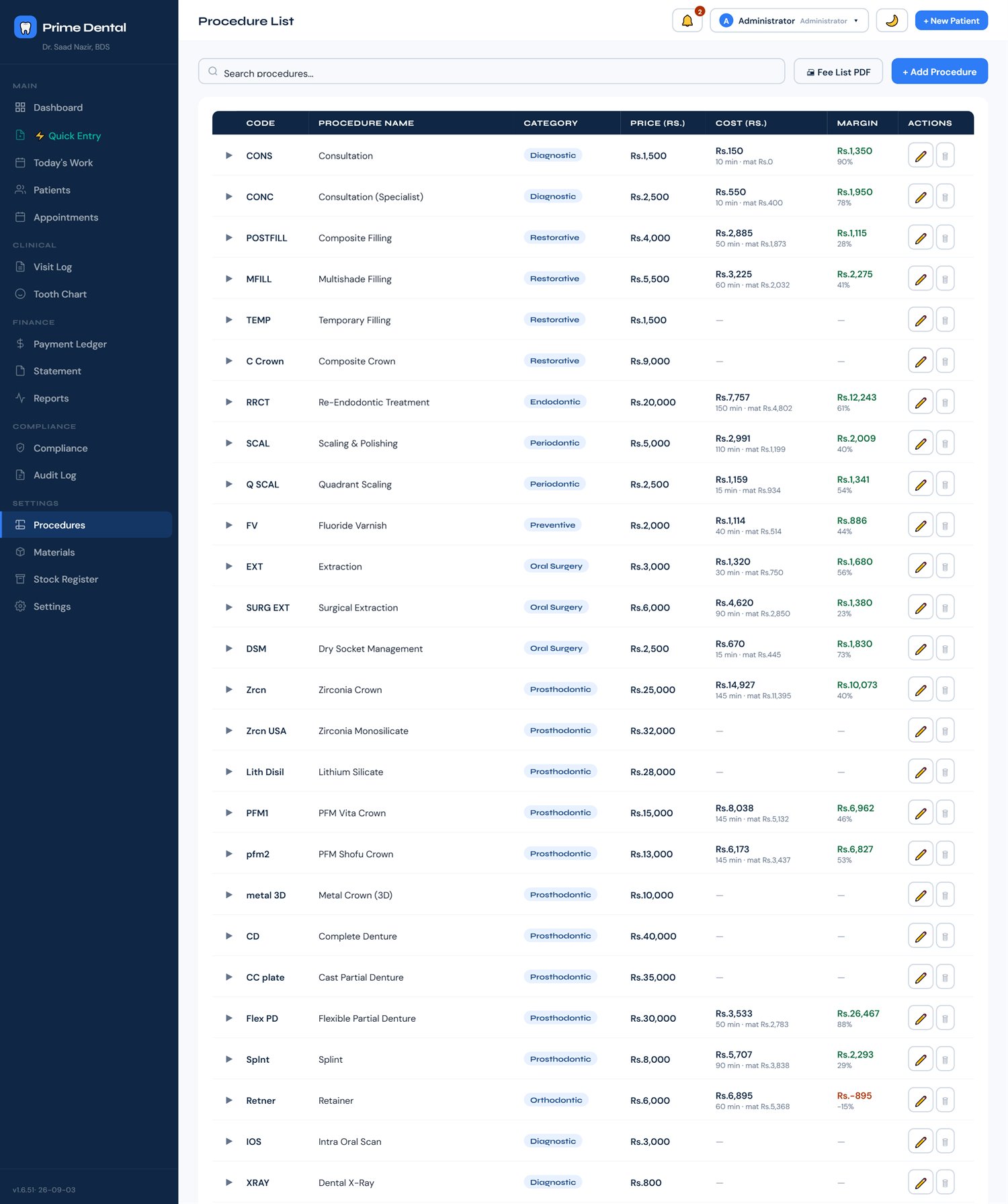
Procedure catalogue with prices, chair minutes and material recipes
12

Ready when the inspector walks in

The registers a PHC inspection asks for, kept as you go instead of reconstructed the night before — referrals, incidents, complaints, sentinel events and adverse drug reactions.
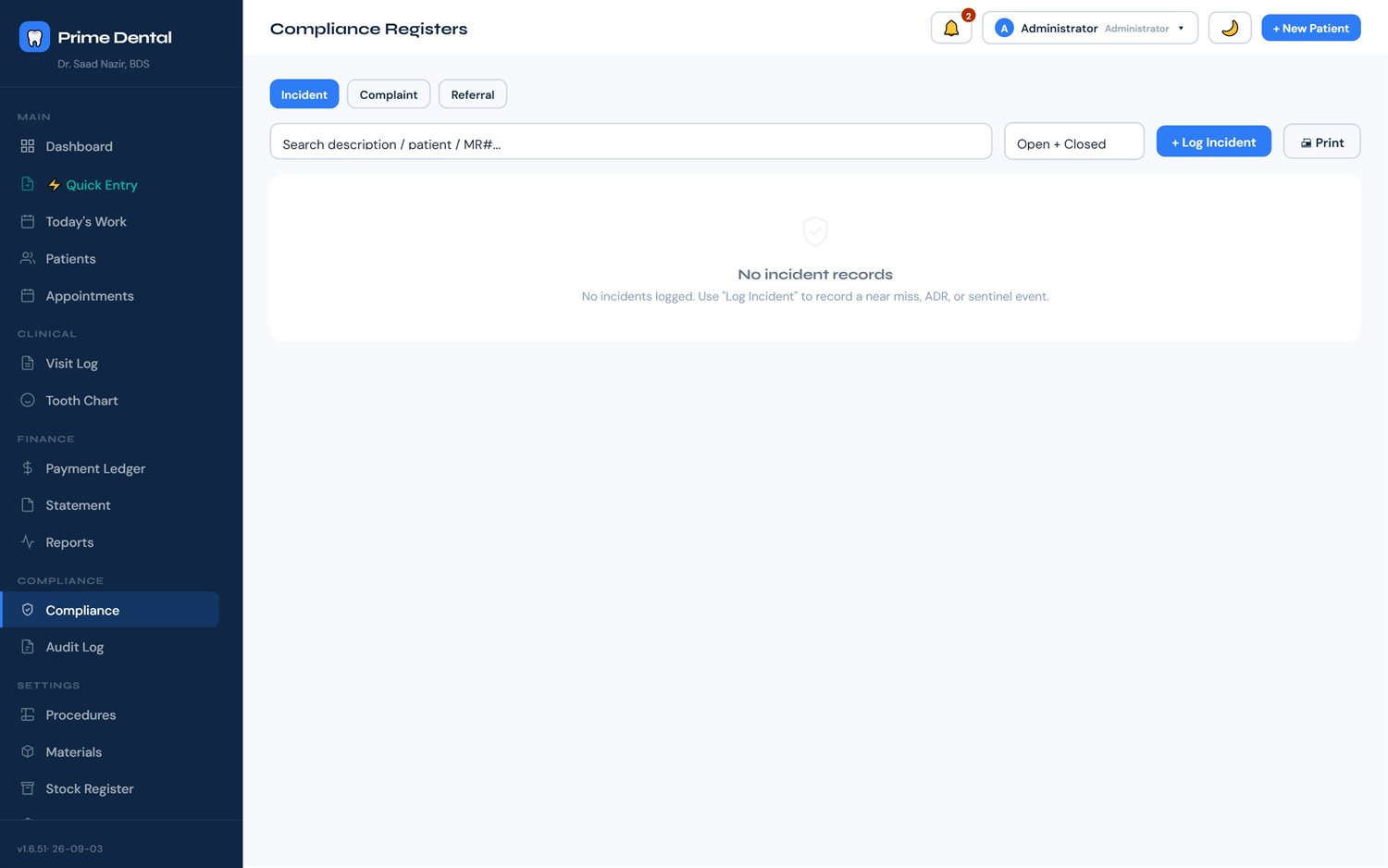
  • A prescription register built from the notes you already write
  • OPD register printed straight from the visit log, for any date range
  • Print a patient's whole file in one go, with or without the money
  • Attach evidence photos to a register entry, and print any register for a chosen period
Compliance registers page
13

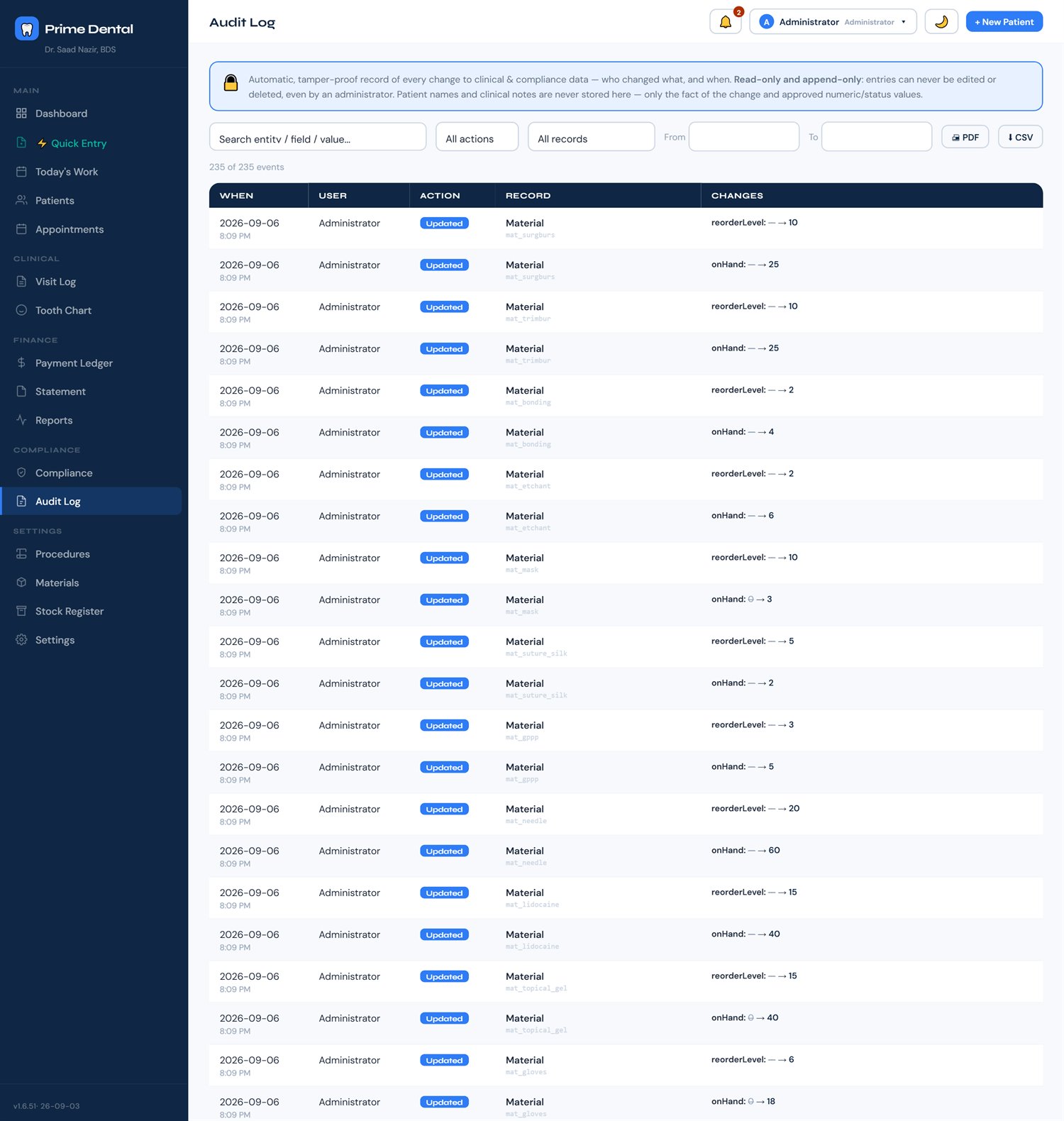
Every change is written down

Who changed what, and when. The audit log records it automatically — you cannot turn it off, and it captures the fact of a change without ever storing the patient's clinical text.
  • Separate logins for you and your staff, with roles
  • Filter by user, action or date and print the report
Audit log listing changes with user, action, entity and timestamp
14

Appointments and recalls

Book the chair, set the status as the day moves, and send reminders straight to WhatsApp. Recalls come back to the dashboard on their own when they fall due.
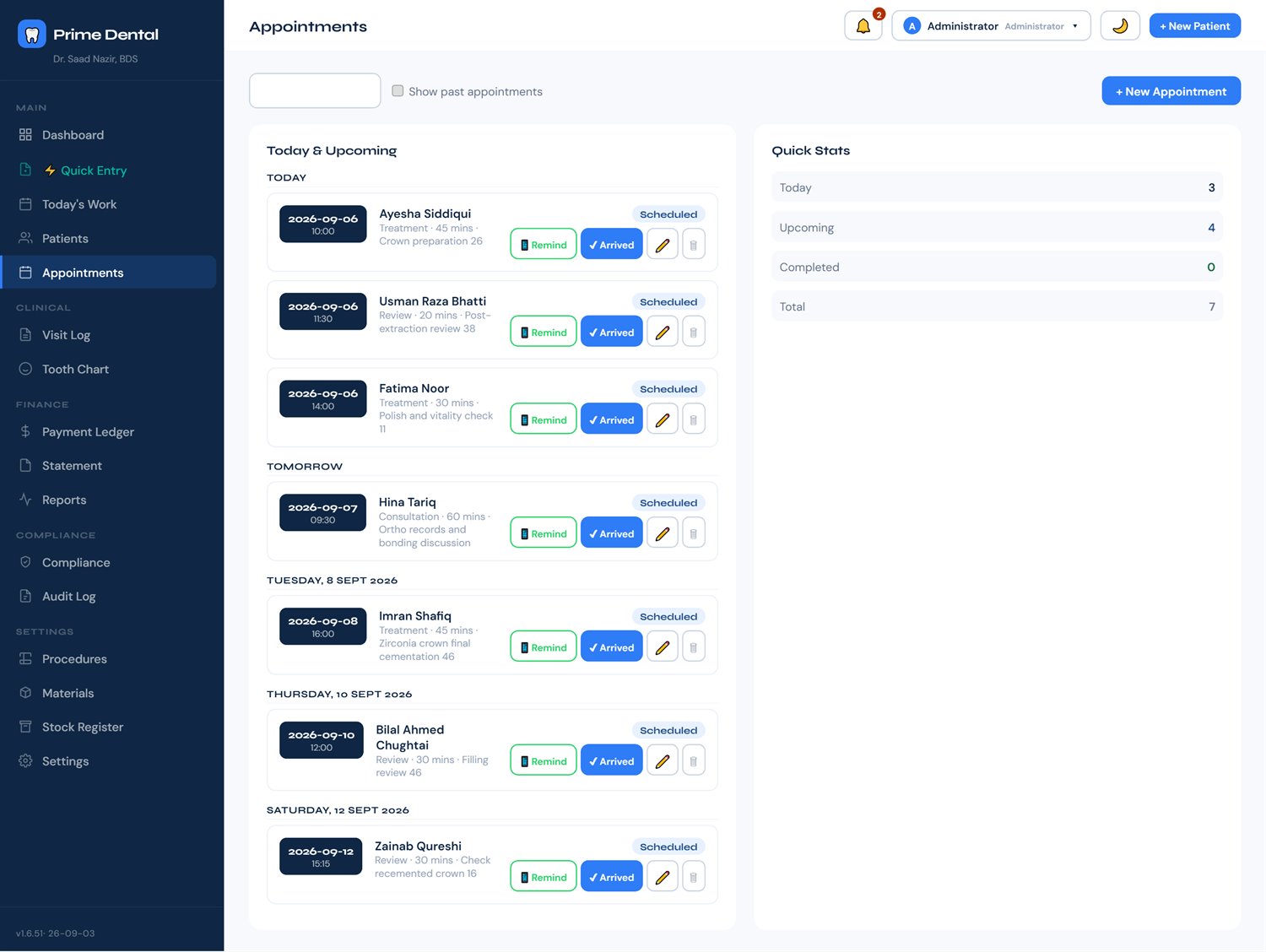
  • Google Calendar sync (optional): appointments appear on your phone, updated as you book
  • When a follow-up patient arrives, the review opens already linked to the right visit
Appointments page with scheduled visits and status
Why offline

Cloud software is somebody else's computer

That's fine for a shopping list. It's a different decision for ten years of patient records in a country where the connection drops and the bill renews every month.

🔌

It works when nothing else does

Load-shedding, a dead router, a bad day at the exchange — none of it reaches your patient records. Notes, billing, printing and registers never wait on a connection.

🔒

Nobody else holds your records

Your patients' names, histories and finances sit on your machine. Not on a server you can't see, in a country you didn't choose, under terms that can change.

📤

You can always walk away

Export the lot to CSV or PDF any time. No subscription holding your data hostage, no migration fee, no "contact sales to close your account".

Pilot programme

Try it in your clinic for a week, free

Prime Dental is being rolled out to a small number of clinics first, so each one gets set up properly. Message me and I'll walk you through the install myself.

Message me on WhatsApp
1
You message meTell me your clinic name and city. We'll find fifteen minutes.
2
I get you installedI send the installer and stay on the call while it goes on — including your first patient.
3
Use it for a weekReal patients, real days. If it isn't earning its place, walk away — your data exports out with you.
Questions

Before you ask

Do I need internet?

Not for the clinic's work. Prime Dental installs on your Windows PC and runs on that machine: patients, notes, charting, billing, stock, registers, printing and backups all work with no connection at all. Three optional extras need internet while you use them:

  • Software updates: checked when the app starts. Offline, you simply stay on your current version.
  • Google Calendar sync: only if you switch it on. Appointments booked while offline are sent when the connection returns.
  • Voice dictation (mic): speech is turned into text by an online service. Typing works offline as always.

WhatsApp buttons open WhatsApp, which of course needs its own connection to send.

Where is my patient data stored?

On your computer, in your clinic. It is never uploaded anywhere. The one exception is optional: if you connect Google Calendar, appointment details (name, time, planned treatment, never fees) go to your own Google account; see the privacy page. Because the data lives on your PC, the backup is your responsibility — the software writes automatic backups to a folder you choose, and I'll set that up with you during installation. Keep a copy on a USB or an external drive.

Can I use it on more than one computer?

Not yet. Each licence is tied to one machine, which is the trade-off for keeping everything offline and local. Most single-chair and two-chair clinics run it on the reception PC. If you need several computers sharing one record, tell me — it changes what I build next.

What happens to my data if I stop using it?

It stays yours. Prime Dental saves a backup to your chosen folder every time you close it, and you can export everything as CSV or PDF whenever you like. When a licence ends, the software stops opening until it is renewed — nothing is deleted, and renewing opens everything exactly as you left it. Your backups are yours either way.

Windows will warn me about the installer. Is that normal?

Yes. The installer isn't code-signed yet — a certificate is an annual cost that only makes sense once more clinics are running. Windows shows "unknown publisher"; you click More info → Run anyway. I'll be on the call with you when you do it.

What does it cost after the pilot?

Message me and we'll talk about it based on your clinic. I'd rather quote you honestly after you've used it for a week than publish a number that fits nobody.

Who built this?

A practising dentist who got tired of the gap between what dental software promises and what it does on a normal Tuesday in a Pakistani clinic. It was built in a working practice, against real patients and real PHC requirements.